Especially when building endpoints for an API layer, every ASP.NET Core developer has to make a choice between Minimal APIs and traditional MVC controllers. Both approaches are fully supported, but they differ in terms of structure, feature set, and underlying execution. One of the most interesting questions is how these differences translate into performance: how much time does the framework spend handling a request from start to finish in each case?
In this article, we’ll take a step-by-step look at what happens under the hood when a request hits a Minimal API endpoint versus a controller action.
The Involved Steps
To accurately compare the performance of Minimal APIs and controller actions, it’s useful to break down the request lifecycle into measurable steps. Each stage represents a distinct part of the framework’s work, and understanding these stages helps pinpoint where time is spent. The main steps we will focus on are:
- Routing – Matching the incoming request to the correct endpoint based on path, HTTP method, and other constraints.
- Endpoint Execution – Invoking the handler. For Minimal APIs, this is the generated lambda delegate; for controllers, it’s the Controller Action Invoker, which handles parameter binding, filters, and action execution.
- Response Serialization – Writing the handler’s result to the HTTP response, including any formatting or conversion to JSON or other media types.
Measuring these three stages allows us to capture the core differences in how Minimal APIs and controllers process requests, while keeping the comparison focused and clear. It’s worth noting that middleware execution is included in both cases, as every request—regardless of endpoint type—passes through the same pipeline, so its cost affects both scenarios equally.
Setting Up a Test App to Measure Performance
A sample ASP.NET application will use a StopWatch object to capture times along the way. The core of the application is listed below.
var builder = WebApplication.CreateBuilder(args);
builder.Services.AddControllers();
var app = builder.Build();
Now let’s add dedicated middleware to initialize the stopwatch. Note that we use a console output stream to capture messages from Kestrel.
app.Use(async (context, next) =>
{
    Console.WriteLine();
    Console.WriteLine(new string('-', 60));

    var sw = Stopwatch.StartNew();
    context.Items["SW"] = sw;

    // Track receipt of the request
    Console.ForegroundColor = ConsoleColor.Cyan;
    Console.Write("[Request start.......]: ");
    Console.ResetColor();
    Console.WriteLine($"{context.Request.GetDisplayUrl()}");

    // Track start of processing
    Console.ForegroundColor = ConsoleColor.Cyan;
    Console.Write("[Request processing..]: ");
    Console.ResetColor();
    Console.WriteLine($"{sw!.Elapsed.TotalMilliseconds:F2} ms since start");

    // Yield recursively to the next middleware
    await next(context);

    sw.Stop();
});
So far, we only have initialized the request pipeline and started the stopwatch. The instance is saved to the Items collection shared among middleware components with the course of the same request. At this stage the output only reports the time in which the web server started working on the request. Next, we resolve the endpoint.
app.UseRouting();
To capture the end of routing, we add another middleware:
app.Use(async (context, next) =>
{
    var sw = (Stopwatch)context.Items["SW"];
    Console.ForegroundColor = ConsoleColor.Cyan;
    Console.Write("[Routing completed...]: ");
    Console.ResetColor();
    Console.WriteLine($"{sw!.Elapsed.TotalMilliseconds:F2} ms since start");

    // Middleware to mark generation of the response for the client
    context.Response.OnStarting(() =>
    {
        Console.ForegroundColor = ConsoleColor.Cyan;
        Console.Write("[Handler completed...]: ");
        Console.ResetColor();
        Console.WriteLine($"{sw.Elapsed.TotalMilliseconds:F2} ms since start");

        return Task.CompletedTask;
    });

    context.Response.OnCompleted(() =>
    {
        Console.ForegroundColor = ConsoleColor.Cyan;
        Console.Write("[Response sent.......]: ");
        Console.ResetColor();
        Console.WriteLine($"{sw.Elapsed.TotalMilliseconds:F2} ms since start");

        Console.WriteLine(new string('-', 60));
        return Task.CompletedTask;
    });

    await next(context);
});
Note that this middleware also connects to response start/end events.
Finally, we add a minimal API endpoint, a controller endpoint and run the application.
app.MapGet("/minapi", async context =>
{
    var sw = (Stopwatch)context.Items["SW"];

    Console.ForegroundColor = ConsoleColor.Cyan;
    Console.Write("[Handler started.....]: ");
    Console.ResetColor();
    Console.WriteLine($"{sw!.Elapsed.TotalMilliseconds:F2} ms since start");

    Thread.Sleep(50);
    await context.Response.WriteAsync("Minimal API endpoint");
});
app.MapControllers();
app.Run();
The minimal API endpoint doesn’t do much, except for waiting 50ms and writing a simple text to the response stream. The controller endpoint does nearly the same:
public class TestController : ControllerBase
{
    [HttpGet("/mvc")]
    public async Task Get()
    {
        var sw = (Stopwatch)HttpContext.Items["SW"]!;

        Console.ForegroundColor = ConsoleColor.Cyan;
        Console.Write("[Method started......]: ");
        Console.ResetColor();
        Console.WriteLine($"{sw!.Elapsed.TotalMilliseconds:F2}");

        Thread.Sleep(50);
        await Response.WriteAsync("Controller endpoint");
    }
}
Note how access to the Items collection of the HTTP context is used to retrieve the same instance of the stopwatch.
Start the Stopwatch
Let’s keep the application in Visual Studio configured to use Kestrel instead of IIS Express. This allows us to conveniently inspect the text being output to the console. Here’s the result when we invoke /minapi.
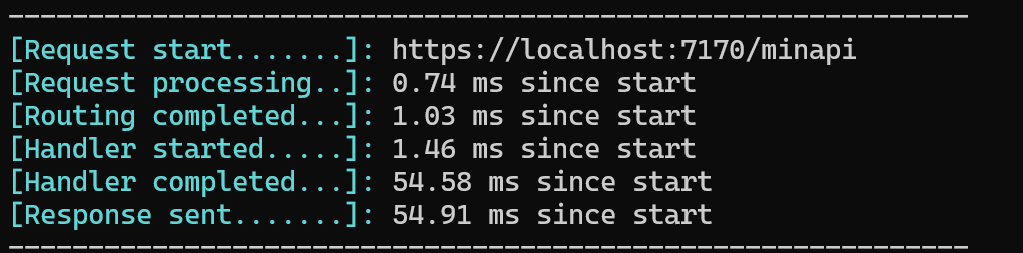
And this is the output when we call /mvc instead.
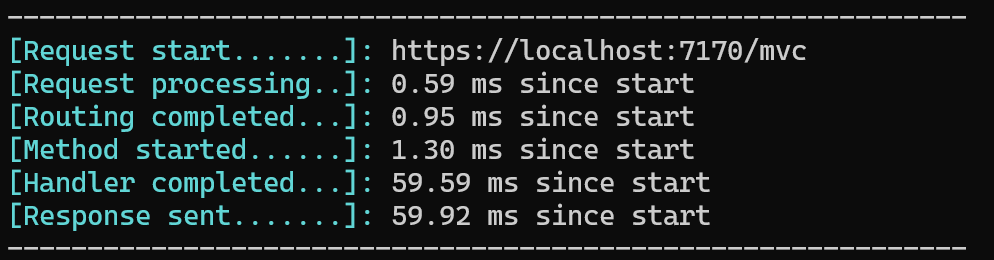
As you can see, the controller endpoint takes slightly longer to complete. That said, there are a few important considerations that apply to any quick-and-dirty performance benchmark.
Understanding the Results
In microbenchmarks, Minimal APIs often execute slightly faster due to objective elements such as simpler routing, direct lambda invocation, and fewer framework features (filters, IActionResult wrapping). However, in real-world scenarios, middleware, I/O, and external services usually dominate the total elapsed time and this could change the landscape.
Note that the first request to a URL may take longer due to JIT compilation and pipeline construction. Subsequent requests are faster. You can easily verify this by calling the same endpoint twice or more.
In such a microbenchmark it could even happen that MVC controller endpoints occasionally run faster than minimal API—the gap is however so small that this is neither surprising nor unusual. Even if the code is identical, small timing differences can appear due to factors outside the framework’s “pure” execution path. Here are the main reasons:
- .NET uses Just-In-Time (compilation. The first requests trigger compilation, and subsequent ones can use optimized code paths.
- MVC actions might occasionally hit already-jitted methods in a way that ends up slightly faster than a minimal API lambda, especially if the lambda triggers new code paths.
- The way objects, delegates, and closures are laid out in memory can affect tiny differences in execution time.
- MVC actions may benefit from pre-warmed routing and controller infrastructure in some cases, giving them a small advantage in microbenchmarks.
The Bottom Line
At equal levels of code complexity, a Minimal API endpoint is generally faster than the equivalent MVC controller endpoint. However, the difference is small, and none of the following assumptions are true in general:
- Using Minimal APIs will skyrocket your API performance.
- Choosing MVC controllers will drag down performance.
A few milliseconds’ difference in either direction is normal and usually insignificant in real-world scenarios. What matters is the overall trend, not the timing of individual requests. Minimal APIs tend to outperform MVC in microbenchmarks under repeated warm requests, but small anomalies can occur due to JIT compilation, caching, or OS-level variability.
As a final note, even if Minimal APIs are consistently faster in your scenario, they have a notable drawback when it comes to organizing code. Keeping a Minimal API codebase clean and well-structured requires strong discipline, whereas MVC controllers enforce a degree of structure through the framework itself. But that topic deserves a separate discussion—and potentially another article.
 Pragmatic Opinions